By EC Team · September 9, 2026 · 8 min read
Many sellers treat brand registration as a task for later. However, establishing your brand presence on Amazon early provides critical operational advantages and legal protections that directly safeguard your revenue.
Amazon Brand Registry is a free program for brand owners with a pending or registered trademark. Beyond brand protection, it grants key selling privileges that reduce upfront costs and streamline product launches.
Core Benefits: Why Register Before Your First Listing?
- Protect Your Listings & Prevent Hijacking: Stop unauthorized sellers from hijacking your ASINs, selling counterfeit goods, or altering your listing details. Registry grants full content control and access to enforcement tools like Report a Violation, Project Zero, and Transparency.
- GTIN / UPC Exemption (No Need to Buy Barcodes): Skip purchasing costly GS1 UPC codes. Brand Registry allows you to apply for a GTIN Exemption and list products using just your Brand Name and SKU.
- Unlock Brand Marketing Tools: Access A+ Content, Amazon Brand Stores, Sponsored Brands Ads, Brand Analytics, and the Vine Program to boost conversion rates and drive traffic.
Prerequisites Before Applying
- Eligible Trademark: An active or pending trademark (word mark or design mark) matching your exact brand name.
- Permanently Affixed Branding: Clear, real-life photos showing your brand printed, engraved, or sewn on the physical product or packaging. Digital mockups or temporary stickers will be rejected.
- Data Consistency: Ensure business information matches across Amazon Seller Central and official government trademark filings.
Step-by-Step: How to Apply for Amazon Brand Registry
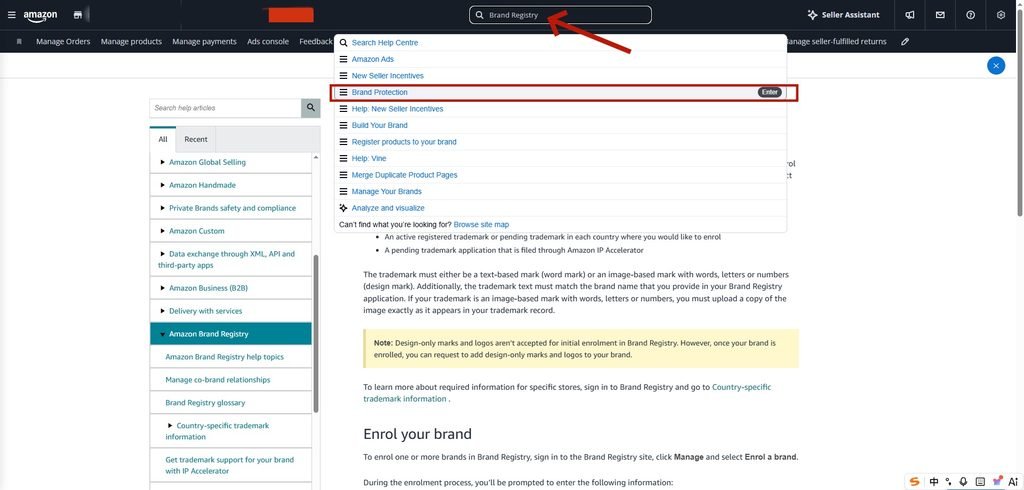
Step 1: Search for Brand Registry in Seller Central
Log into Amazon Seller Central. In the top search bar, type “Brand Registry” and select Brand Protection from the dropdown menu.
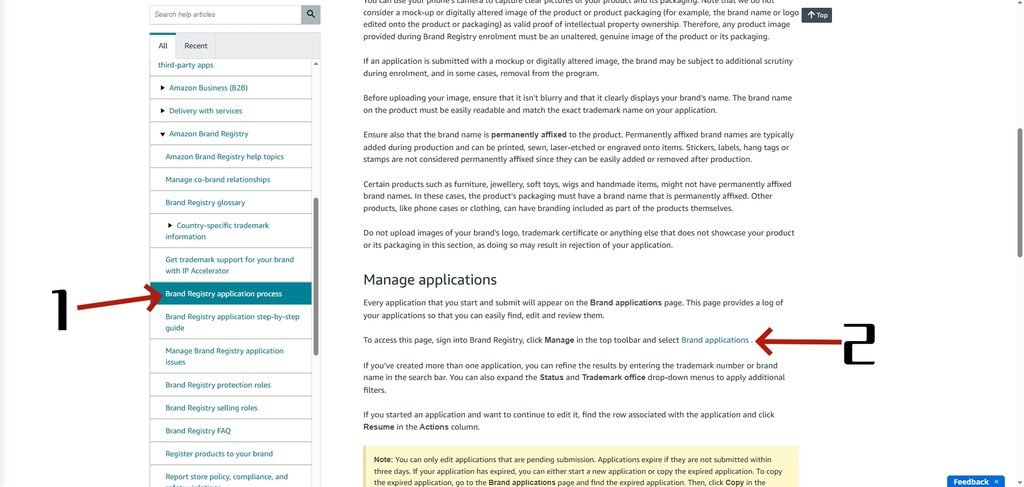
Step 2: Open the Brand Applications Portal
In the left navigation menu, click Brand Registry application process (1), then select Brand applications (2) inside the main text box.
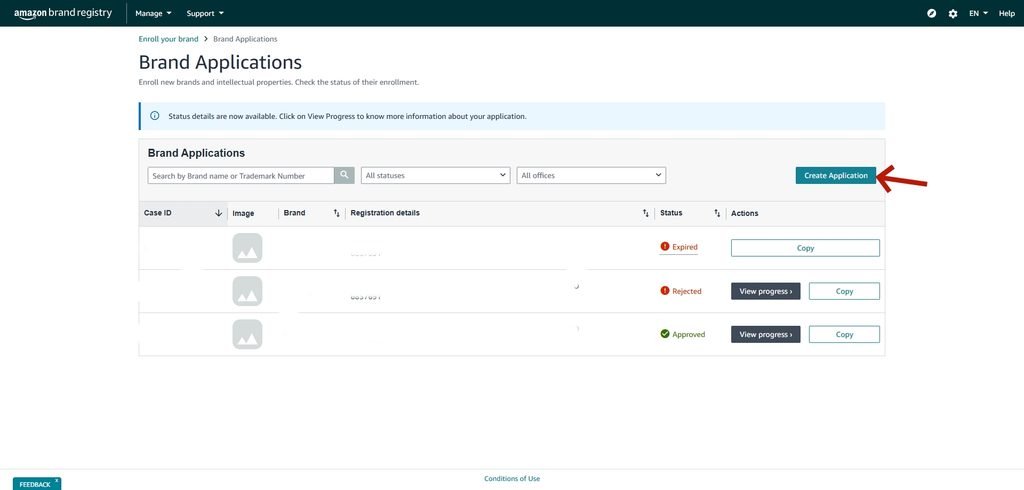
Step 3: Initiate a New Brand Application
On the Brand Applications dashboard, click the blue Create Application button on the right side to launch your submission.
Step 4: Enter Brand & Trademark Details
Type your Brand Name exactly as registered. Select your Trademark Office, mark type, and enter your official Serial or Registration number.
Step 5: Upload Product & Packaging Photos
Upload high-resolution, unedited photos showing your brand permanently affixed to your physical product or packaging.
Step 6: Submit & Check Your Case Log (Crucial Step)
Provide your manufacturing and distribution details, then submit. Amazon will automatically create a ticket in your Brand Registry Case Log.
- Direct Approval: Your application may be approved immediately without extra steps.
- Verification Code Required: Amazon will send a verification code to the public contact or attorney listed on your official trademark record. Retrieve this code and reply directly to the open Case in your Case Log to finalize your approval.
Fast-Tracking Your Brand Protection
- Acquiring an Existing Trademark: You can purchase an active trademark through a compliant brokerage to skip lengthy registration waiting times. Requirement: The legal transfer of ownership (assignment) must be formally recorded with the official trademark office (such as the USPTO) before submitting your application to Amazon.
- Amazon IP Accelerator: File a new trademark through an Amazon-approved law firm to gain accelerated access to Brand Registry features within weeks while your application is officially pending.
Common Pitfalls to Avoid
- Text Mismatches: Capitalization, spacing, or spelling differences between your application and official trademark records.
- Temporary Branding: Using removable stickers, hangtags, or photoshopped logos instead of physical, permanent branding.
- Unrecorded Ownership: Applying before the official government registry reflects the legal assignment of a purchased mark.